EAGLE SOLUTIONS
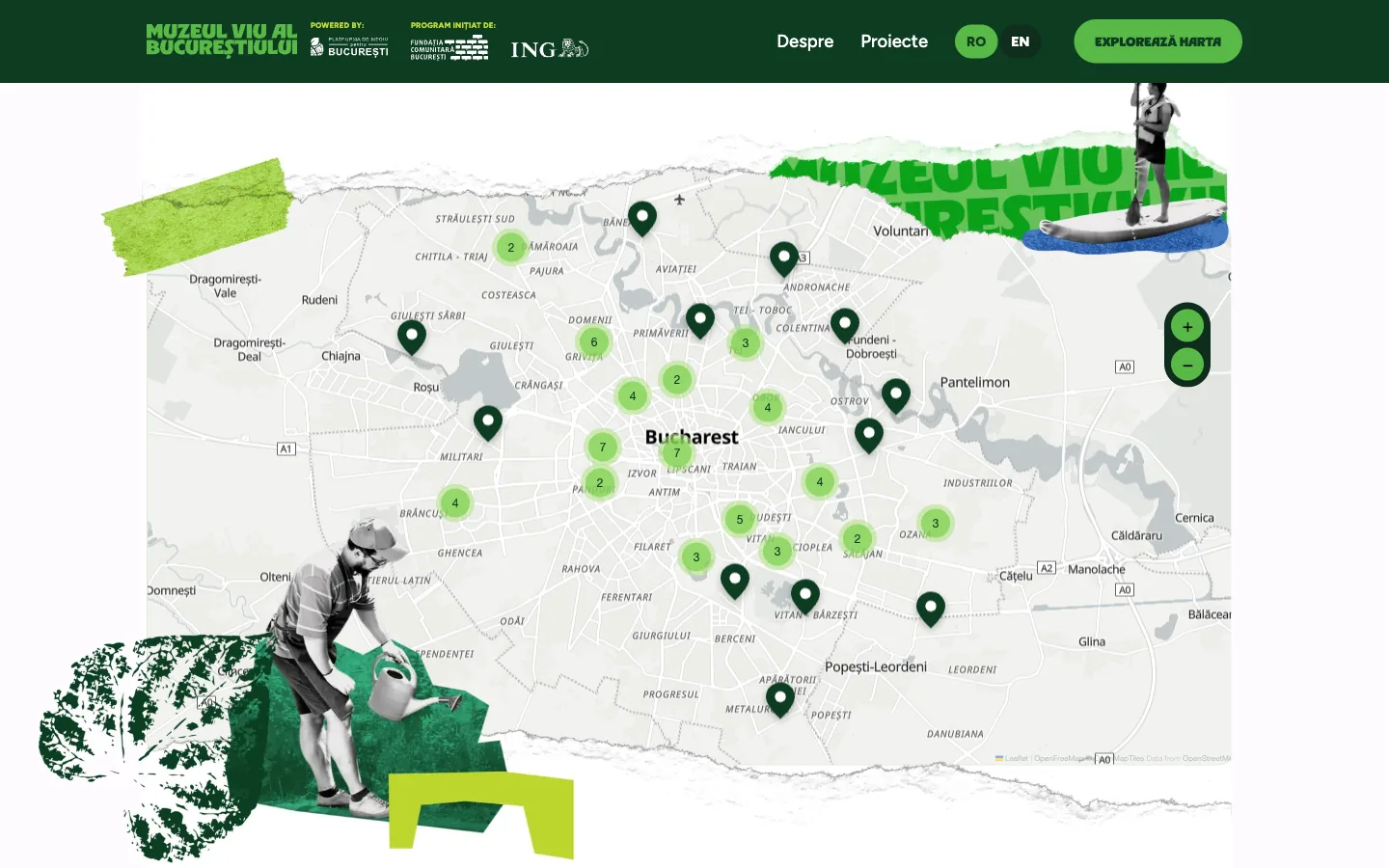
I worked on the Muzeul Viu al Bucureștiului (Living Museum of Bucharest) website with a partner agency. The agency handled the design and the client relationship, and I did the WordPress development, from the map and the filters to the admin. The site gathers the environmental projects delivered in the Platforma de Mediu pentru București programme on one map, so that visitors go and see them in person.
The challenge
The Platforma de Mediu pentru București programme was launched by the Bucharest Community Foundation and ING. Through it, NGOs delivered environmental projects across the city: community gardens, composting points, protected green spaces, education programmes. The site had to present them in a way that makes people want to visit. That is why a map sits at the centre of the site, and everything else is built around it.
My contribution
- A custom WordPress theme and a dedicated map plugin based on the Figma designs, for mobile and desktop.
- A Leaflet map with markers coloured by category. In dense areas nearby points merge into a numbered cluster that splits apart as you zoom in.
- Search by name, filtering by theme category (the categories are split into two groups), sorting, and the map narrows down to the results.
- One project can appear at several points. The composting network, for example, means 25 locations around the city.
- Themed routes: the "Începe traseul" (Start the route) button narrows the map down to the stops of the route, with a route bar that can be closed.
- Project pages with a gallery, the organisation behind the project and a button that opens directions to the location in Google Maps.
- Romanian and English with Polylang, with separate URLs for each language.
- Every text, image, menu and category is editable from the admin. I wrote a Romanian admin guide as a PDF, and editors only see the menu items meant for them.
- Event pages, and a "Coming soon" page that can be switched on for the period before launch.
The result
The site is live: 68 projects at 85 points, in seven theme categories, with four recommended routes. The organisers add new projects without a developer, and the map shows them straight away.
The map only asks for data
The code that draws the map does not reach into WordPress. It requests the points and routes from a dedicated, documented data interface (REST API) with stable field names. This was the client's request, and for good reason: if the map ever moves to another platform, or a mobile app wants to use it, the data stays where it is.
When the free map quota runs out
At first the map background came from a provider with a free monthly quota. In October the traffic reached that quota and the map background disappeared. I switched to OpenFreeMap, which has no such limit. For a public site promoted through campaigns, this is the choice to make from the start.
Edits show up right after saving
On a cached site it is easy for an editor to save while visitors keep seeing the old data for hours. Here the cache clears itself whenever the map content changes, and the data interface URLs are versioned with the time of the last change. So the organisers can check their work right after saving.
On mobile the map does not trap scrolling
On a phone, a full-width map easily becomes a trap: your finger drags the map and the page stops scrolling. So on mobile the map moves with two fingers, and one finger keeps scrolling the page.